XF Sign Any Document
by XFanis
$17.00
total
/ version
Buy on Odoo Apps Store
Official Odoo store · pay by card
Requires
Odoo modules
Base
Web
XF Sign Any Document
Add electronic/digital signature functionality for document forms.
How it works:
After installing the module, you can add char field for any model and add this field to the form view of this model.
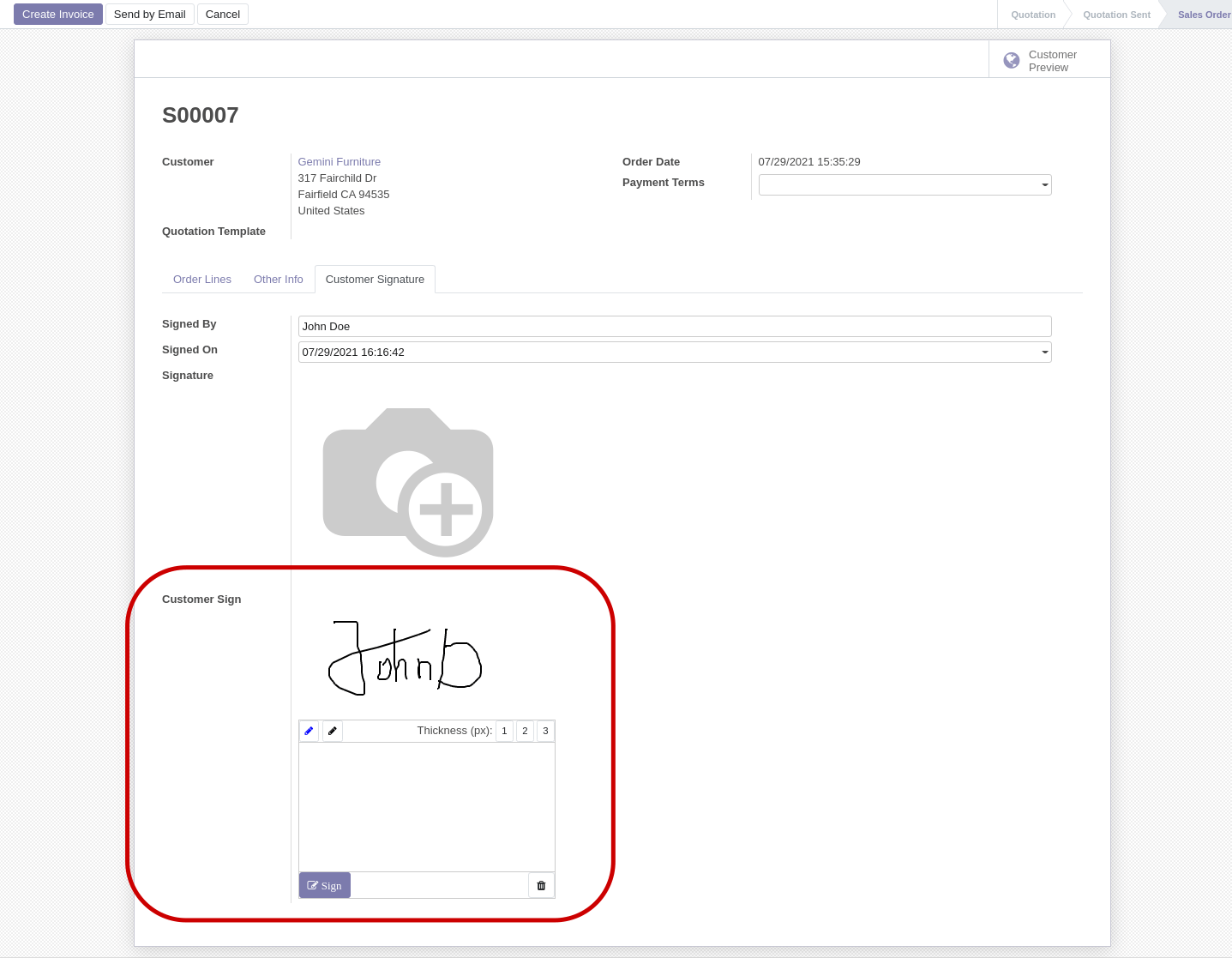
Use widget draw_sign and some options: <field name="x_sign" widget="draw_sign" options="{'mode':['show', 'draw']}"/>
Available options:
- mode: ['show', 'draw'] - widget mode
- ['show'] to show already drawn signature,
- ['draw'] - to show drawing area,
- ['show', 'draw'] - to display image and drawing area.
- confirm: true/false - ask confirmation of user on click the "Sign" button
- width: 300px - width of drawing area and image
- height: 150px - height of drawing area and image
- button_title: 'Sign' - the title of the button
For users it will look like that:
Quick Demo
Please watch the video
DocSign Campaigns Module
If you want to start and manage document signing campaigns for your employees please look this module: XF DocSign Campaigns
Contact me for Support, Customization, Implementation:
Email: sales@xfanis.dev
Telegram: https://t.me/xfanis
Email: sales@xfanis.dev
Telegram: https://t.me/xfanis