MCP Server for Odoo
Key Features:
- Native MCP protocol - Streamable HTTP transport and HTTP+SSE transport, JSON-RPC 2.0, protocol version 2024-11-05.
-
Bearer token authentication - Odoo API key via
Authorization: Bearerheader. Brute-force protection with per-IP lockout. - Full CRUD toolset -search, read, create, write, unlink, count, default_get, method_call, list_modules, list_companies -all configurable from the UI.
- MCP Resources -expose system info, model field schemas, per-model access info, module metadata, and individual record data as structured resources discoverable by the AI.
- Custom Prompts -admin-managed global prompts and user-created personal prompt templates with named argument substitution.
- Odoo-native ACL -the same access rights the user has in the browser are enforced for every MCP operation. No privilege escalation possible.
- Per-model MCP overrides -optional Access Control records let admins further restrict models: limit operations, filter fields, block methods, restrict groups.
- Read-Only Mode -admins can enable a global read-only mode to restrict all MCP users to safe read operations (search, read, count, read_group, etc.), disabling create, write, unlink, and method_call for everyone. Individual users can also opt in to read-only mode from their own preferences. The global setting always takes priority.
- Full audit trail -every MCP request is logged with user, session, method, tool name, IP address, duration, and response status. Configurable retention.
- Session management -TTL-based MCP sessions with automatic expiry and manual termination via the DELETE endpoint.
- Rate limiting -per-user configurable request rate cap.
- IP filtering -allow-list or deny-list strategy with CIDR support.
- Timezone-aware datetimes -reads return values in the user's local timezone; writes accept local-timezone strings and convert to UTC automatically, mirroring browser behaviour.
How It Works
After installing the module, Odoo exposes a single MCP endpoint at /mcp.
Any MCP-compatible AI client (Claude Desktop, Cursor, VS Code with the MCP extension, etc.)
can connect using your Odoo URL and an API key as Bearer token, and start interacting
with your ERP data through natural language.
The AI discovers available tools, resources, and prompts automatically through the MCP protocol's capability exchange. It can then search records, read field values, create or update data, call business methods -all subject to the same Odoo access rights as the authenticated user.
Compatible AI Clients and IDEs
The MCP Server for Odoo works out of the box with any tool that supports the Model Context Protocol. This includes desktop AI assistants, AI-powered code editors, browser extensions, and custom agent frameworks.
- Claude Desktop and Claude.ai - Connect Anthropic's Claude directly to your live Odoo data. Ask Claude to summarize sales pipelines, find overdue invoices, create new partners, or explain field relationships - all without leaving the chat interface.
- Cursor AI - Odoo developers using Cursor can connect the editor directly to a staging or production instance and have the AI read model definitions, search records, or validate business logic against real data while coding.
- VS Code with MCP extension / GitHub Copilot - Any VS Code AI extension that supports MCP tool calls can use this server to query Odoo models, retrieve field schemas, or run searches as part of an agentic workflow.
- Codex, Windsurf, Cline - AI coding agents like Codex, Windsurf and Cline can connect to Odoo to explore module structure, read configuration records, or automate repetitive ERP data tasks directly from the editor sidebar.
- Continue.dev and open-source MCP clients - Any open-source AI agent or MCP host that speaks Streamable HTTP or SSE transport is compatible.
- ChatGPT and OpenAI Codex - Connect ChatGPT (via OpenAI's MCP client support) or Codex-powered agents to Odoo for natural language ERP queries, record creation, and data retrieval workflows.
- Local AI models via LM Studio and Ollama - Run fully private, on-premise AI workflows by connecting LM Studio or Ollama (with an MCP-compatible agent layer) to Odoo. Your data never leaves your network.
- Custom AI agents and automation scripts - Build your own AI-powered Odoo automation using the MCP protocol with any LLM provider: OpenAI, Anthropic, Google Gemini, Mistral, or local models via Ollama and LM Studio.
Configurable Tools
All MCP tools are stored as Odoo records and can be reviewed, reordered, or extended
from the MCP → Configuration → Tools menu.
Each tool has a name, description, JSON Schema for its parameters, and maps to a
Python method on the mcp.tool model.
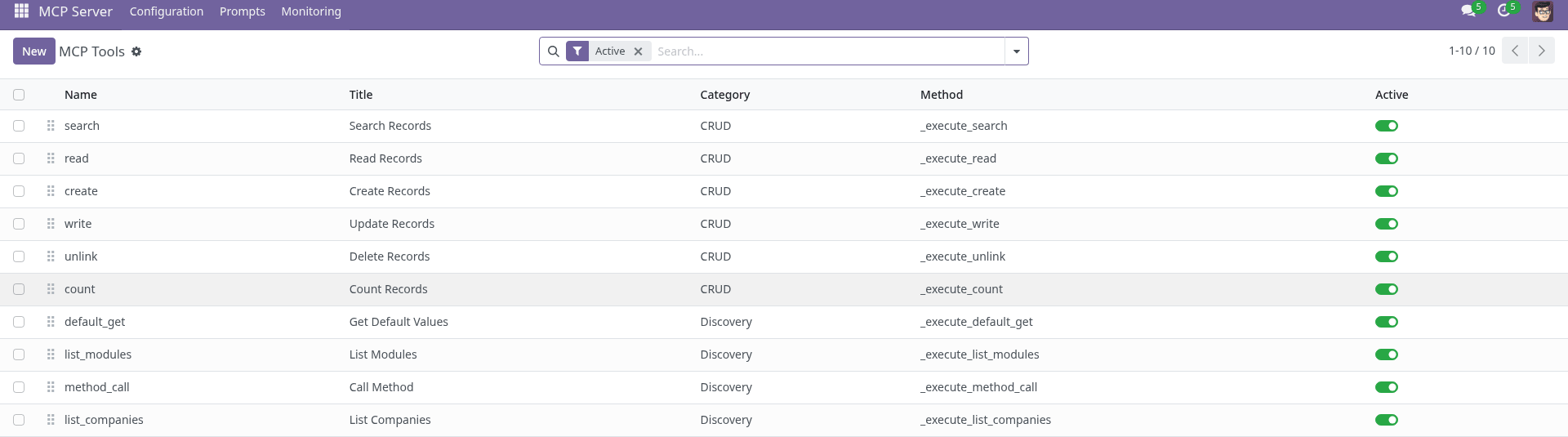
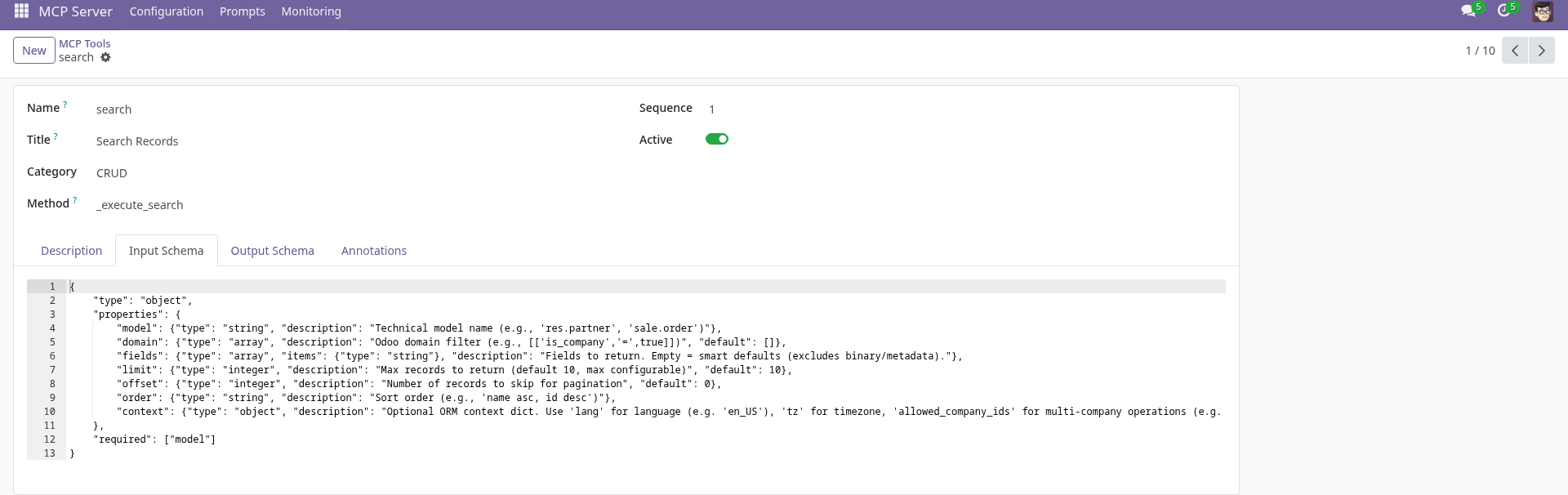
Each tool record stores the full JSON Schema used to describe parameters to the AI, the display title, description, category, and optional structured output schema.
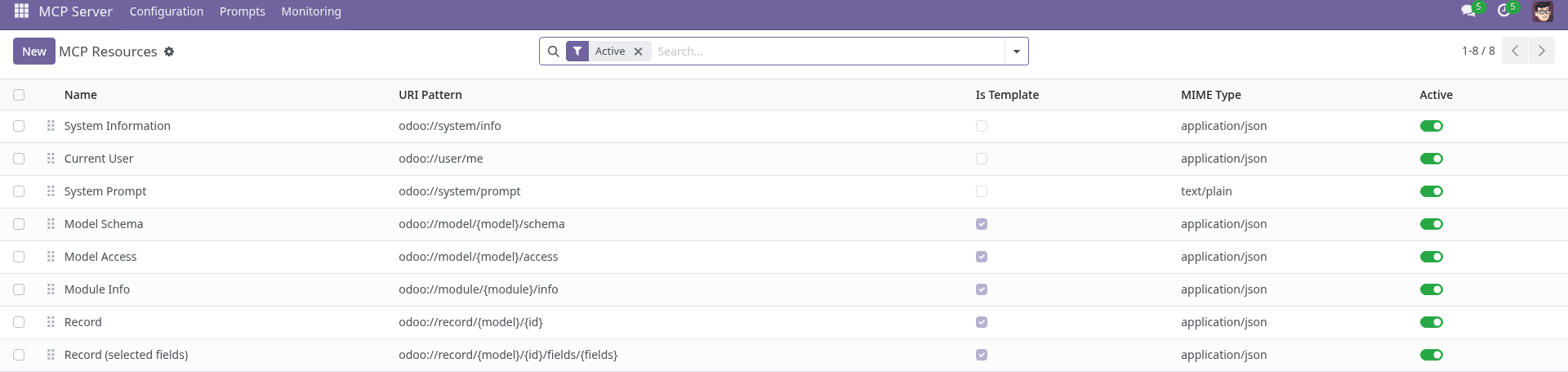
MCP Resources
Resources provide structured, readable information to the AI without requiring a tool call. Manage them under MCP → Configuration → Resources. Built-in resources include system information, model field schemas, access metadata, module details, and dynamic record templates.
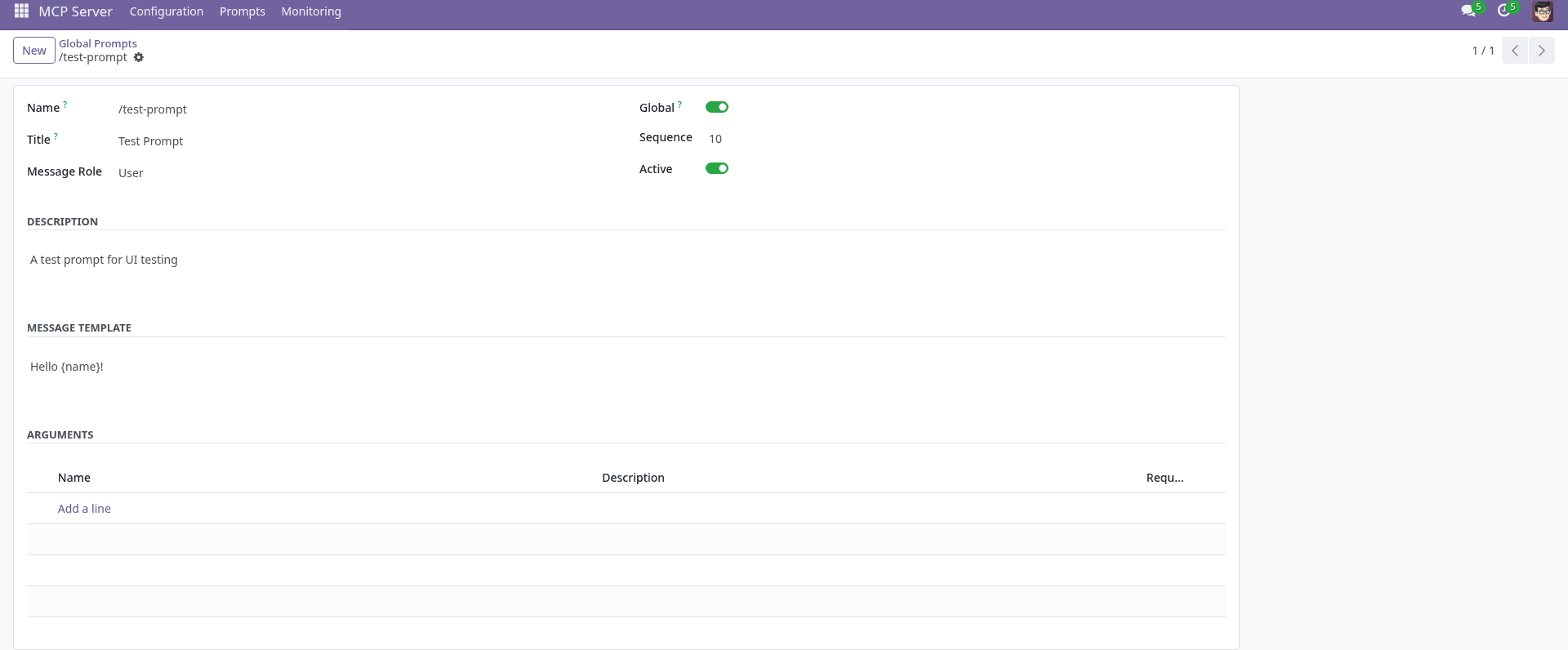
Custom Prompts
Prompt templates let admins define reusable instructions for the AI that users can invoke by name. Manage global prompts under MCP → Configuration → Global Prompts. Users can also create their own personal prompts from MCP → My Prompts.
Templates support named argument placeholders ({argument_name}) with required/optional
validation. The AI receives the rendered prompt as a structured message.

Per-Model Access Control
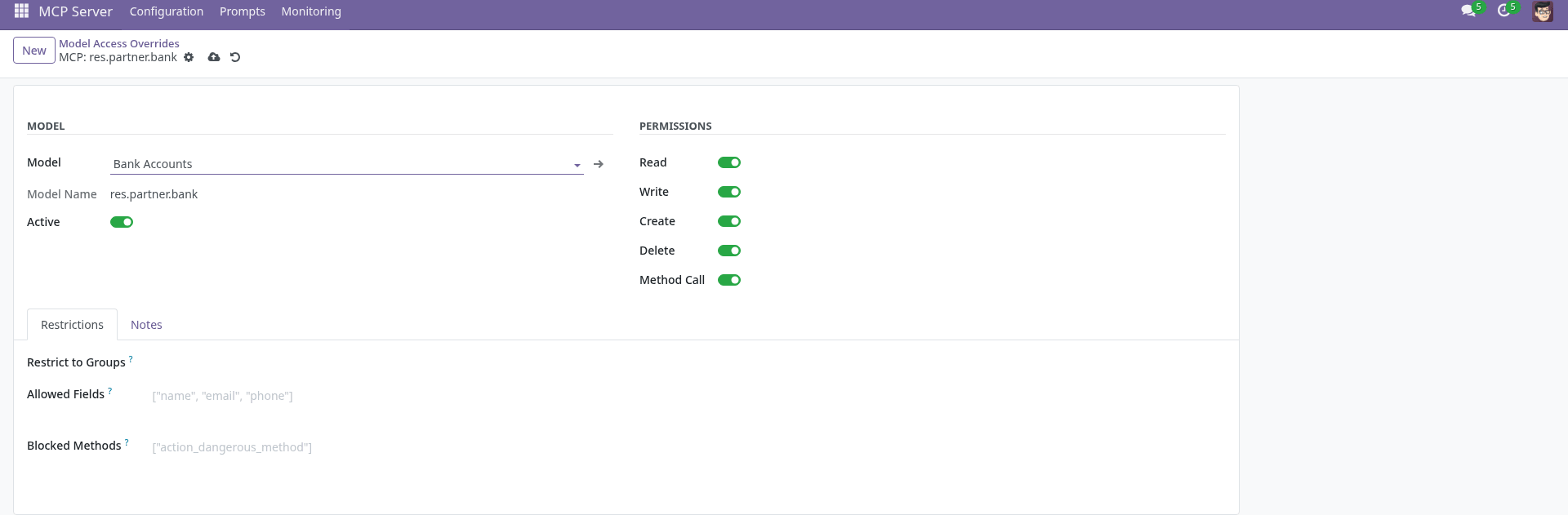
While Odoo's native ACL is always enforced as the primary security layer, the optional MCP Access Control records let administrators add an additional restriction layer per model: disable specific operations (read, write, create, delete, method calls), whitelist allowed fields, block specific methods, or restrict access to certain security groups.
Audit Trail
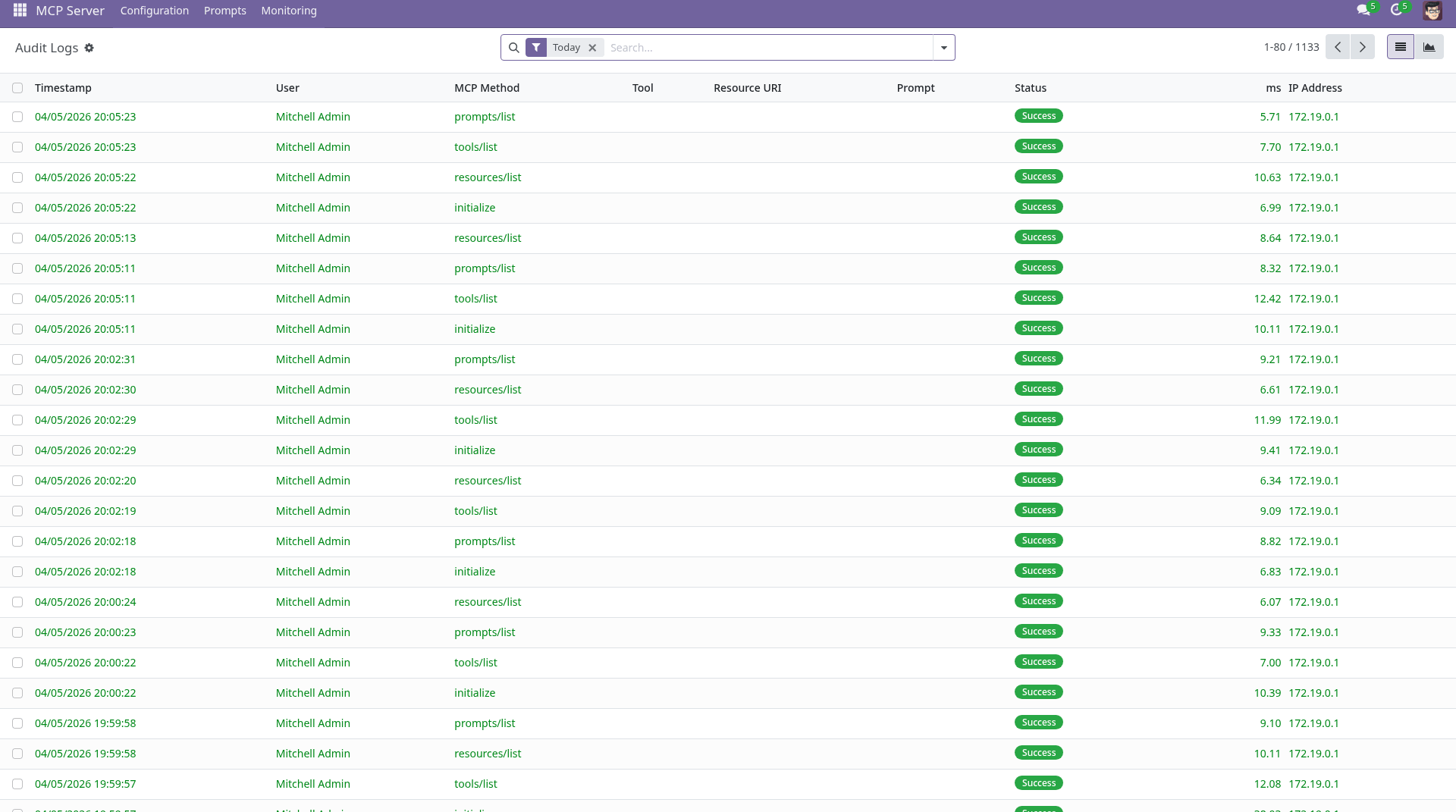
Every MCP request is recorded in the audit log -accessible under MCP → Monitoring → Audit Logs. Each entry captures the authenticated user, session ID, MCP method, tool or resource name, request data, response status, IP address, user agent, and processing duration.
Configuration & Settings
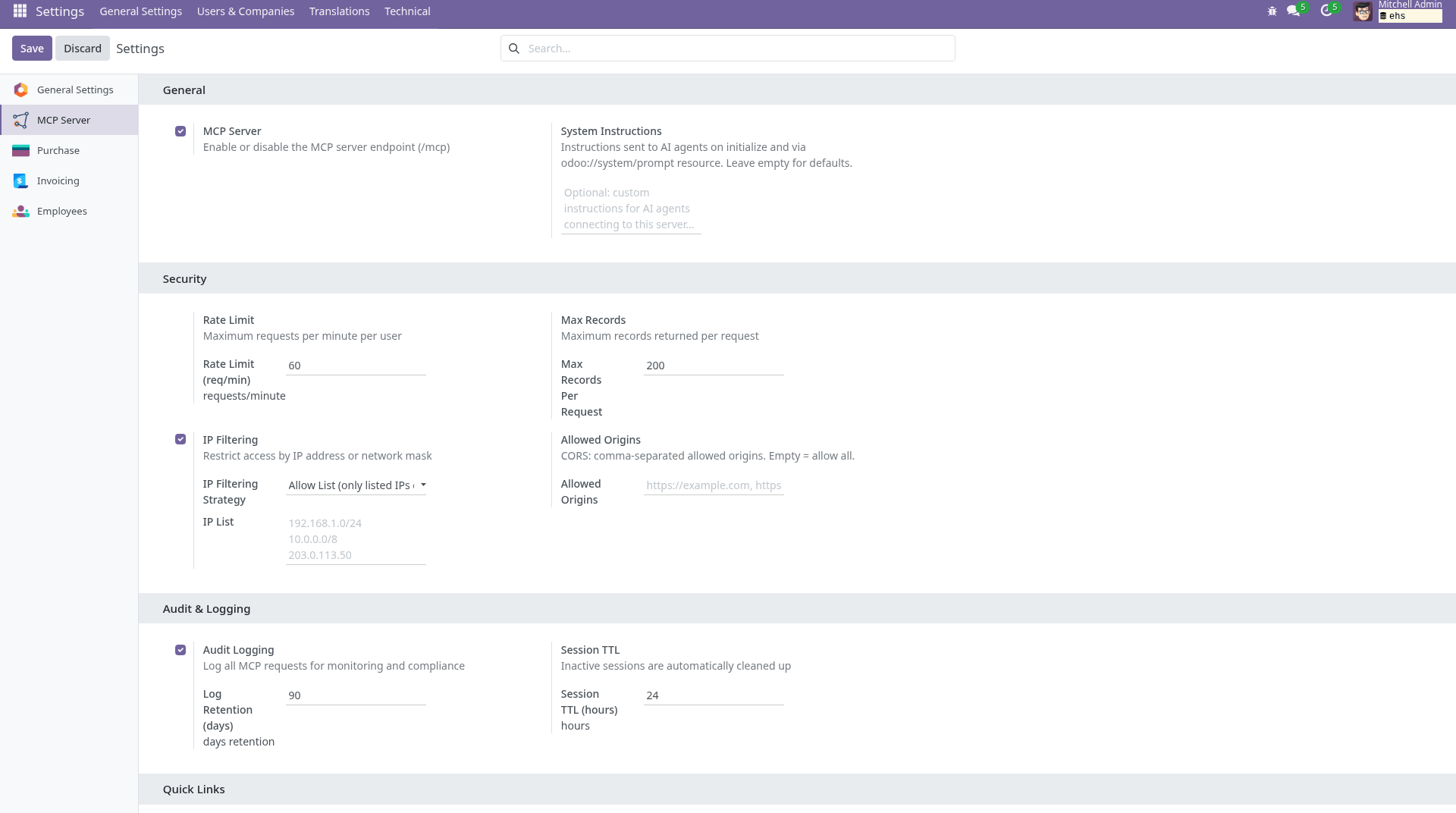
The MCP server is configured from Settings → General Settings → MCP Server. Options include enabling/disabling the server, global read-only mode, rate limit, session TTL, maximum records per response, audit log retention, allowed CORS origins, and IP filtering rules. Individual users can also enable read-only mode for their own MCP sessions from their user preferences.
Use Cases
Odoo AI integration for developers. Connect Cursor, VS Code Copilot, or any MCP-compatible IDE to a live Odoo instance while building custom modules. Ask the AI to describe model field schemas, search for existing records to validate logic, or read configuration data - all without switching context from the editor.
Business intelligence and natural language queries. Let non-technical users ask plain-English questions about ERP data through Claude Desktop or a similar AI chat interface. "Show me all unpaid invoices from last month" or "Which sales orders are still in draft?" - the AI translates the request into Odoo domain queries and returns structured results.
AI agent automation for routine ERP tasks. Build agentic workflows that create records, update statuses, or process bulk operations using any MCP-compatible AI agent framework. The Odoo native ACL ensures the agent can only touch what the authenticated user is permitted to access.
Secure AI access for multi-company and multi-user Odoo setups. Each AI client authenticates with its own API key or credentials, inheriting exactly the same access rights as the corresponding Odoo user. Per-model MCP overrides let admins add extra restrictions on top of ACL without modifying security groups.
Private on-premise AI with local models. Run fully air-gapped AI workflows by pairing the MCP server with a local language model served via Ollama or LM Studio. Your Odoo data never leaves the network - the AI assistant runs on your own hardware while still accessing live ERP records through the MCP protocol. Ideal for organizations with strict data residency or confidentiality requirements.
Audit-ready AI usage in regulated environments. The full audit trail records every AI request - who asked, what was read or changed, from which IP address, and with what result. This makes the module suitable for organizations that need traceability of AI-driven ERP interactions.
Quick Start
- Install the MCP Server module.
- Generate an API key for your user: Settings → My Profile → API Keys → New.
-
Add your Odoo instance to your MCP client configuration:
- URL:
https://<your-odoo-host>/mcp - Authorization:
Bearer <your-api-key>
- URL:
- Ensure your user belongs to the MCP User or MCP Administrator security group.
- Start chatting -ask the AI to search records, summarise data, or update fields.
Technical: Multi-Database Setup (optional)
This section is only relevant for Odoo installations that serve
multiple databases from a single server. Single-database setups
(db_name set in odoo.conf) can skip this.
In a multi-database setup the MCP endpoint must be reachable before a database
registry is loaded - for example when an MCP client connects without a browser
session and passes the target database via the ?db= query parameter.
Without the fix below, such clients receive a 404 Not Found.
Add xf_mcp to server_wide_modules in
odoo.conf:
server_wide_modules = base,web,xf_mcp
This causes Odoo to load the module at server startup via its
post_load hook, which patches the HTTP dispatcher to resolve
?db= for any path starting with /mcp.
Example MCP client URL for a multi-database setup:
https://odoo.example.com/mcp?db=my_production_db
Technical: Nginx Configuration (optional)
This section is only relevant when Odoo is served behind an Nginx reverse proxy and the HTTP+SSE transport is in use. Direct connections and the Streamable HTTP transport (POST /mcp) work without any Nginx changes.
Standard Nginx proxy settings buffer responses and close idle connections, which
breaks SSE streams and causes timeouts on slow tool calls. Add a dedicated
location /mcp block before the generic
location / block:
# MCP endpoints - SSE requires no buffering and long timeouts
location /mcp {
    proxy_pass              http://odoo-upstream;
    proxy_buffering         off;
    proxy_cache             off;
    proxy_read_timeout      3600s;
    proxy_set_header        Connection '';
    chunked_transfer_encoding on;
}
Key settings explained:
-
proxy_buffering off- Forwards SSE events to the client immediately instead of holding them in the buffer. -
proxy_cache off- Prevents caching of the streaming response. -
proxy_read_timeout 3600s- Keeps SSE connections open for up to one hour. The default 60 s would close idle streams between keep-alive pings. -
proxy_set_header Connection ''- Removes theConnection: closeheader so the upstream keep-alive connection stays open. -
chunked_transfer_encoding on- Required for streaming chunked responses through the proxy.
The /mcp/message path (HTTP+SSE transport) is covered by the same
block because Nginx prefix matching applies to all paths starting with
/mcp.
Want to know when this module gets a new version or fixes? Subscribe to updates (one email to sales@xfanis.dev, no spam).