Approval Delegation on Time Off
by XFanis
module: $5.00 + deps
Price breakdown
Official Odoo store · pay by card
Approval Delegation on Time Off for Odoo
Features
- An "Approval Substitute" field on the time off request, filled in by the employee.
- When the time off is approved, an approver substitution is created for exactly its dates, on all approval routes: purchase, sale, invoices, payments, transfers, expenses and loans, with the matching Dynamic Approval Workflows modules.
- When the time off is refused, cancelled or reset, the substitution is archived. Approved again, it comes back with the current dates.
- Time off types without validation start the substitution as soon as the request is saved.
- Only the employee, or an approval manager, names the substitute: a time off officer who records time off for others cannot hand an approver's right to someone else.
- The substitute's decisions show in the chatter as "approved by Bob on behalf of Alice", and the employee keeps their own right to decide.
- Works with Odoo Community: Time Off is a Community app, no Enterprise approval rules needed.
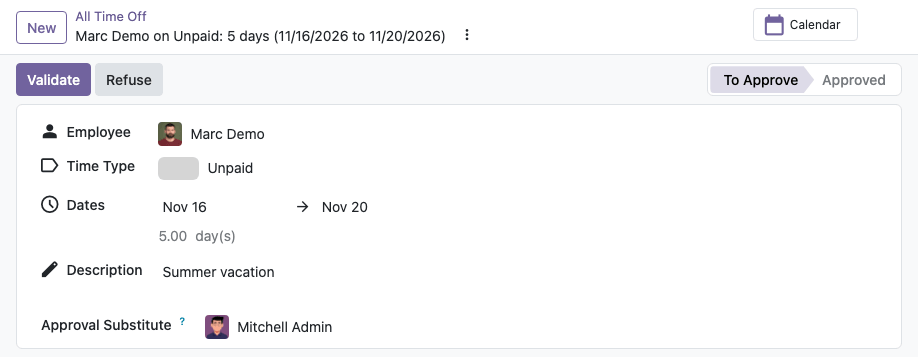
Time Off Request
The employee chooses the colleague who decides on their approvals while they are away. Nothing is handed over until the time off is approved.
Substitution Created on Approval
The approved time off creates an approver substitution for its dates. The employee finds it under My Preferences, Approval Substitutions; approval managers also see the time off it came from.

How to use
- Install the module together with Dynamic Approval Workflows and the approval modules you use.
- Request time off and choose the "Approval Substitute".
- Once the time off is approved, the substitute approves documents waiting for you during its dates.
- Refuse or cancel the time off and the substitute's right ends with it.
For an absence without a time off request, or a substitution limited to some routes, create the substitution by hand under My Preferences, Approval Substitutions.
Email: sales@xfanis.dev
Telegram: https://t.me/xfanis
Want to know when this module gets a new version or fixes? Subscribe to updates (one email to sales@xfanis.dev, no spam).