Maintenance Plans by Meter & Calendar, Work Orders, Checklists (CMMS)
by XFanis
/ version
Price breakdown
Official Odoo store · pay by card
Available Versions
Requires
My modules
Odoo modules
Used by
Maintenance Plans by Meter & Calendar, Work Orders, Checklists (CMMS) for Odoo
Maintenance Plans by Meter and Calendar
- Calendar, meter, one-off and threshold triggers; whichever comes first decides
- Floating, fixed grid or window anchoring, early and late tolerances in units or percent
- "Last done" from the maintenance log: an emergency repair, a bigger service or an external act also counts
- A smaller job due together with a bigger one that includes it is covered: no duplicate request
- Seasons (a due out of season moves to the start of the next one), working days, due dates from certificates, lead time and reminder stages
- Overdue activities and overdue locks, released automatically when the work is done
- Interval source and reference for audits; every change of a plan or trigger in the chatter
Meters and Readings
- Cumulative meters (hours, kilometres, cycles) and gauges (temperature, thickness)
- Readings by hand, from measurement steps, from imported history, inherited by child meters with the same increment
- Readings in the past, meter replacement with a continuous total, suspect values above the daily maximum are saved with Value Confirmed
- Correct Reading voids a wrong value with a reason and cancels the requests it triggered
Templates, Import and Start
- Plan templates per equipment category create the plans and missing meters of new equipment
- Interval changes reach the plans with an impact preview; detached plans keep their own settings
- Imported plans start as drafts with a forecast; imported history sets their anchors
- Start Plans creates the due requests and at most one overdue request per plan
Generation, Forecast and PM Compliance
- Daily generation in the company time zone, in batches, with errors isolated per plan and a run log
- Generate Now for supervisors of their teams; an alert when no run succeeded
- Maintenance forecast by period, equipment, category and team, with planned hours
- PM compliance: on time, early, late, late excused, covered, skipped, missed
- The next due date and the plan and meter buttons on the equipment form
Work Orders and Checklists
- One work order for one equipment or a group of equipment: a van and its engine, a VRF system and its indoor units
- Task lists with typed steps: instruction, check, measurement with acceptance and physical ranges, text, photo, property
- Task lists that include other task lists: "Timing Belt Service" also performs "Oil Change"
- Pauses with reasons, downtime segments, net duration and reaction time
- Close wizard: equipment state, fixed or not, failure codes, certificates, meter readings and the plan dates before and after
- Acceptance by the requester, the equipment owner or the team responsible
- Printed work order with blank result fields, or with the results and "before → after" values
Maintenance Log and Equipment Locks
- One log line per type of work, equipment and date, with result, certificate number and "valid until"
- External, initial and manual lines for work done outside Odoo
- Locks by source: overdue maintenance, failed check, manual, quarantine, scrap; each released only by an event of its own source
- A failed safety check locks the equipment as soon as the result is saved
- Scrap and conserve wizard that lists what still blocks the decision; conserved equipment pauses its plans
QR Requests without a User Account
- QR labels with the equipment name and serial number, several per page
- A public form: description, equipment status, photo, name and contact; a "Do not use" banner for blocked equipment
- Rate limit per IP address and equipment, spam trap, status page with its own link
- Logged-in employees land on the equipment form with a new request open
- The team responsible links the reporter to an existing or new contact after checking who it was; typed data never link a contact by themselves
KPIs and Reporting
- MTBF without duplicates and cancelled requests, MTTR in hours from the net repair time
- Availability over 12 months, reaction time, repeat failures and cost on the equipment form
- Every KPI button explains on hover what its number means and how it is computed
- Work order analysis per section with pivot and graph views
- PM compliance report: early, on time, late, missed, covered and skipped maintenance by team, equipment and month
- A unit moved to another company takes its plans along and keeps its history readable
- Trend of meter readings, estimated readings, and data quality filters (stale meters, archived references, equipment without plans)
- Weekly digest per company: locks, overdue plans and requests, backlog, draft plans and generation errors
Roles, Audit and Multi-Company
- Technician, supervisor, manager, viewer, cost and compliance roles
- Optional restrictive audit trail for the chatter of maintenance records, plans and meters
- Plans, readings, requests, work orders and log lines always belong to the company of the equipment
Screenshots
Work order: sections and steps
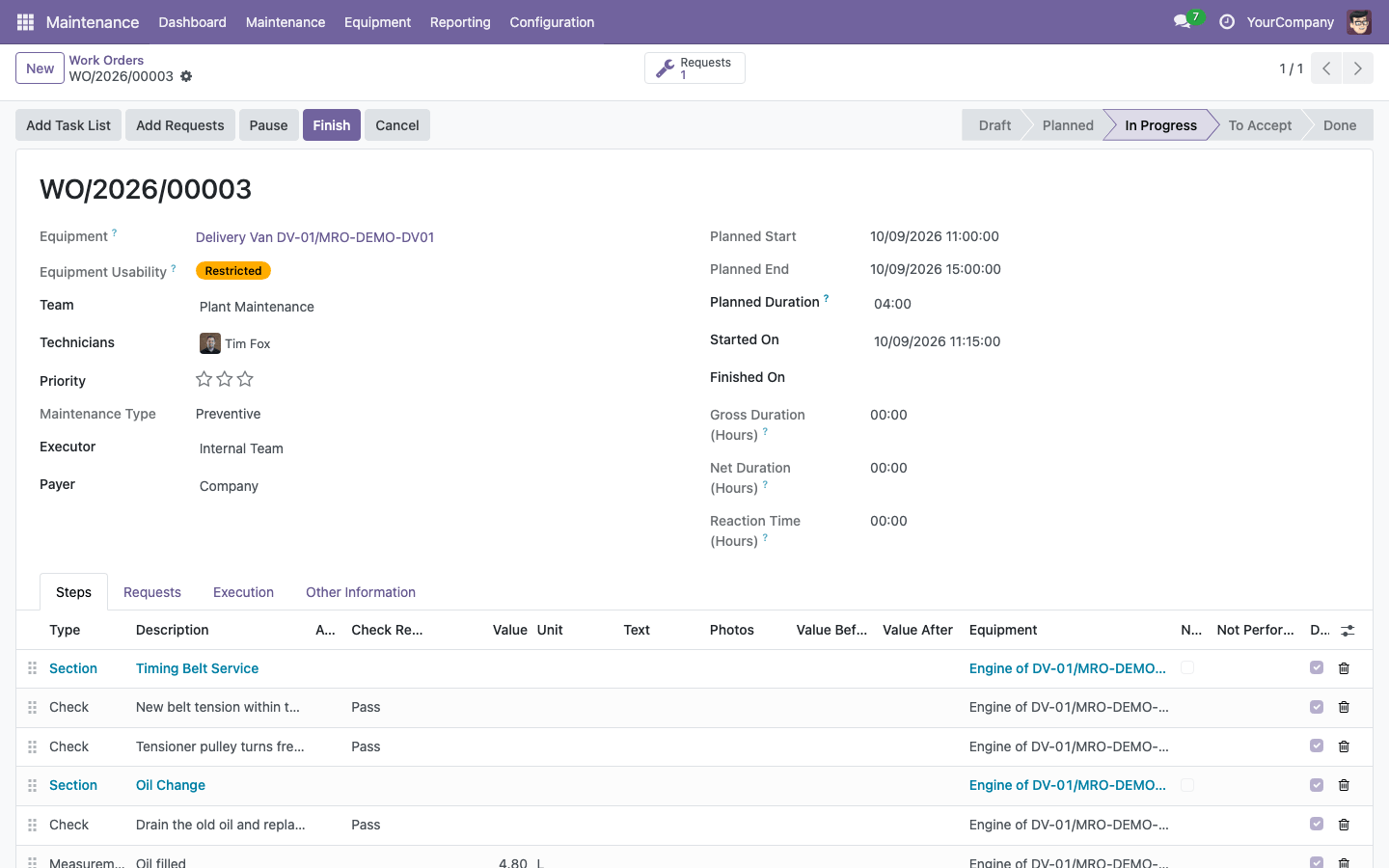
One work order on a delivery van covers two jobs on its engine: the timing belt service and the oil change it includes. Each job is a section with its own steps (checks, measurements with limits, properties), so the technician sees exactly what to do and the log credits each job separately.
Work orders by state
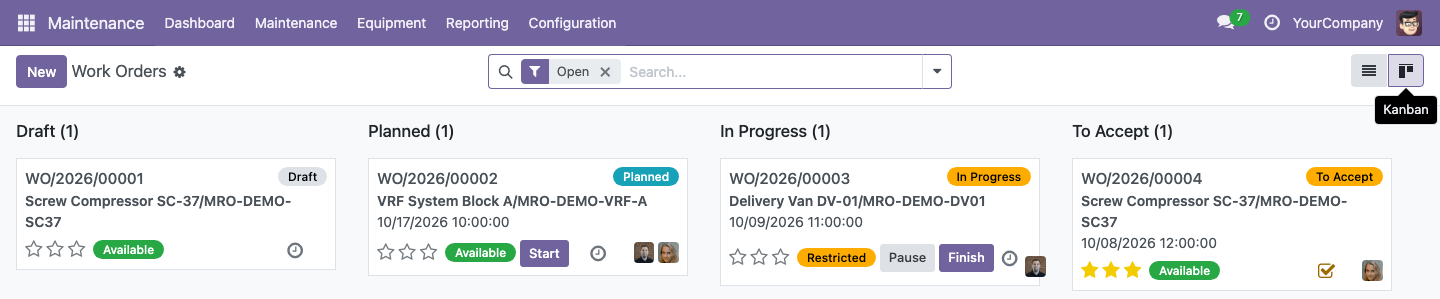
The kanban follows the life of a work order from draft to acceptance. Each card shows whether the equipment may be used, who works on it and the next action: Start, Pause, Finish, or Accept for the person who has to accept the work.
Closing the work
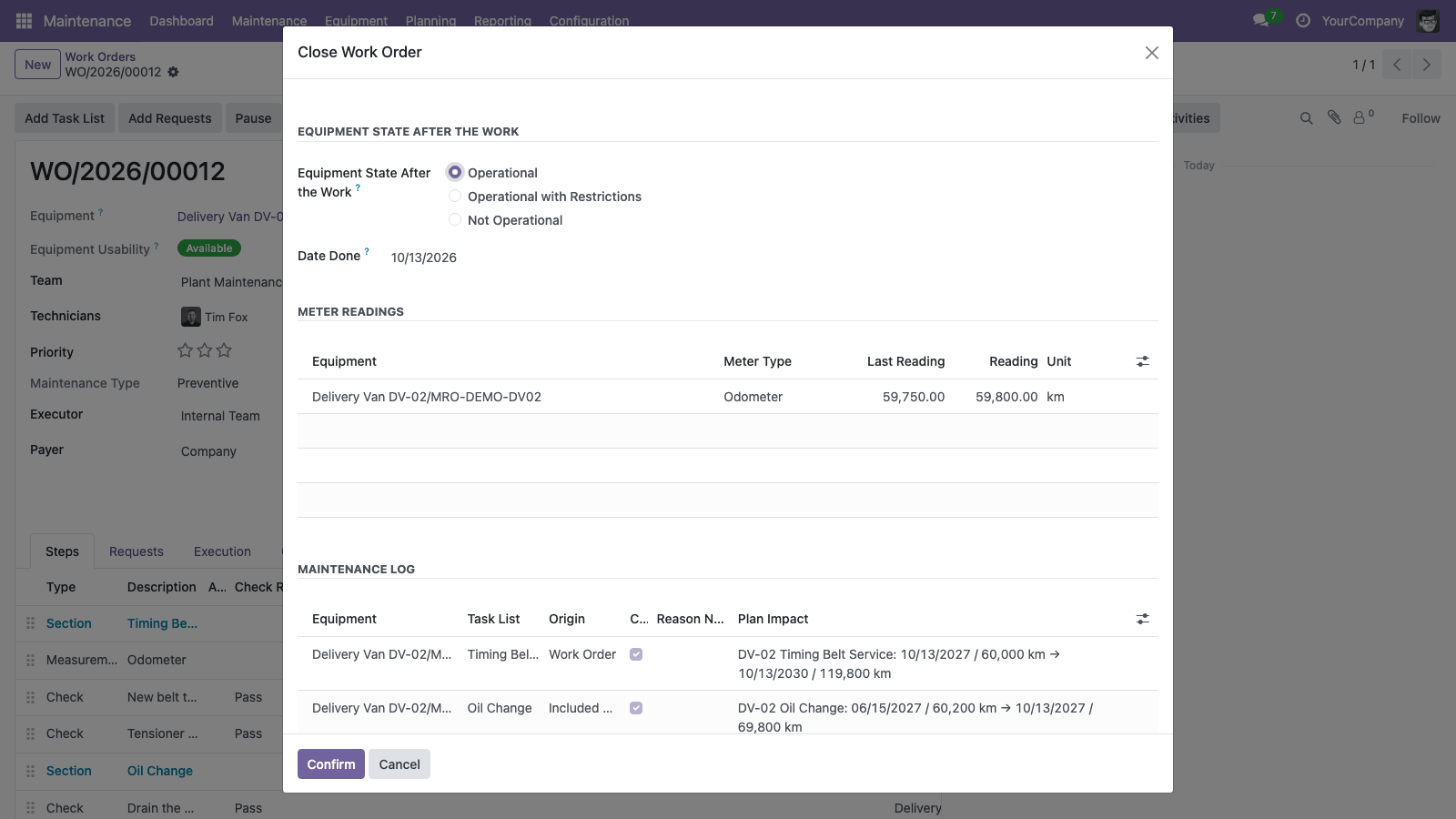
Finish opens one wizard for every decision at the end of the job: is the equipment fixed, may it be used again, which failure codes apply, which jobs go to the maintenance log and with which result and certificate. Nothing is applied until the work is accepted.
Equipment KPIs with an explanation on every button
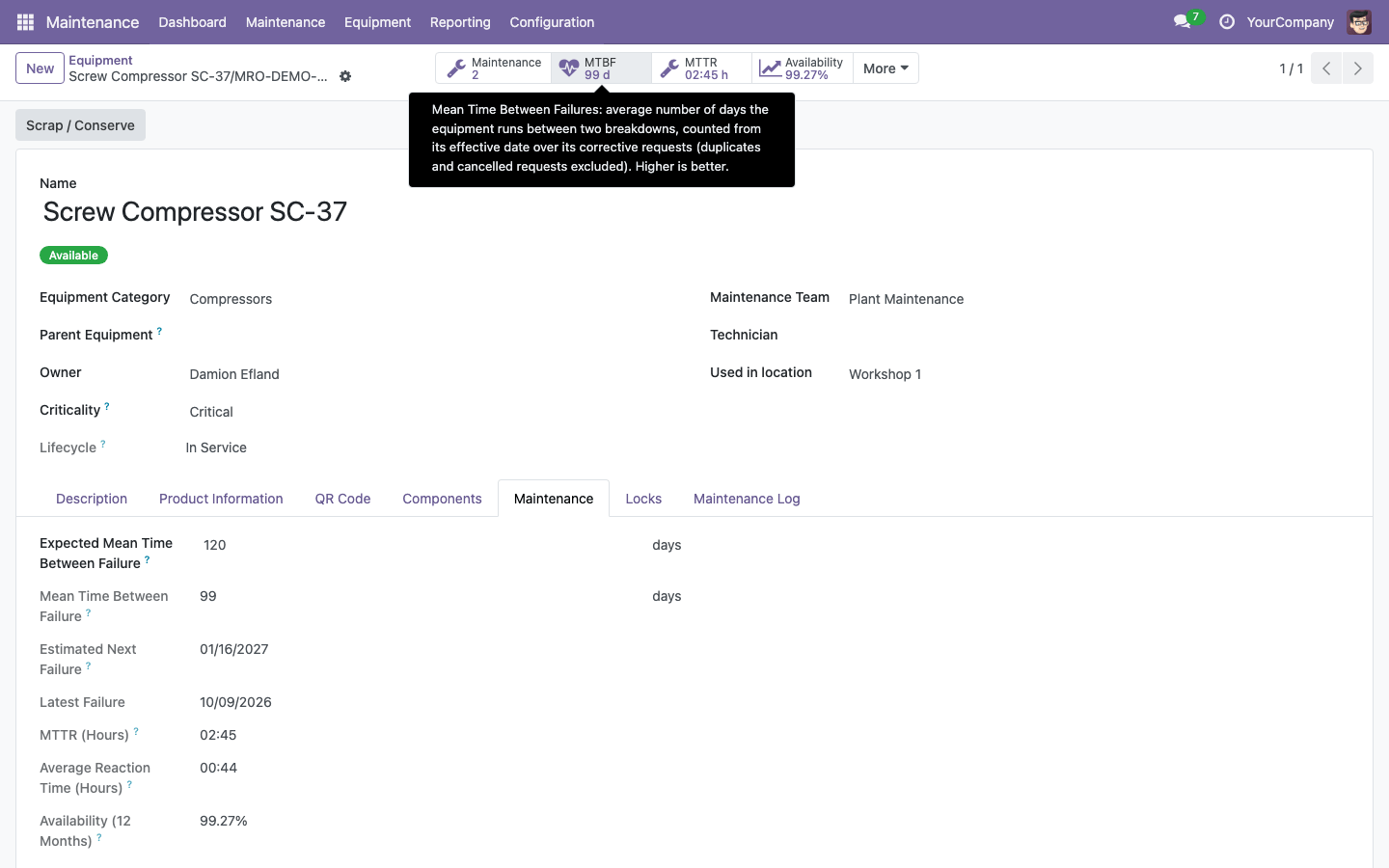
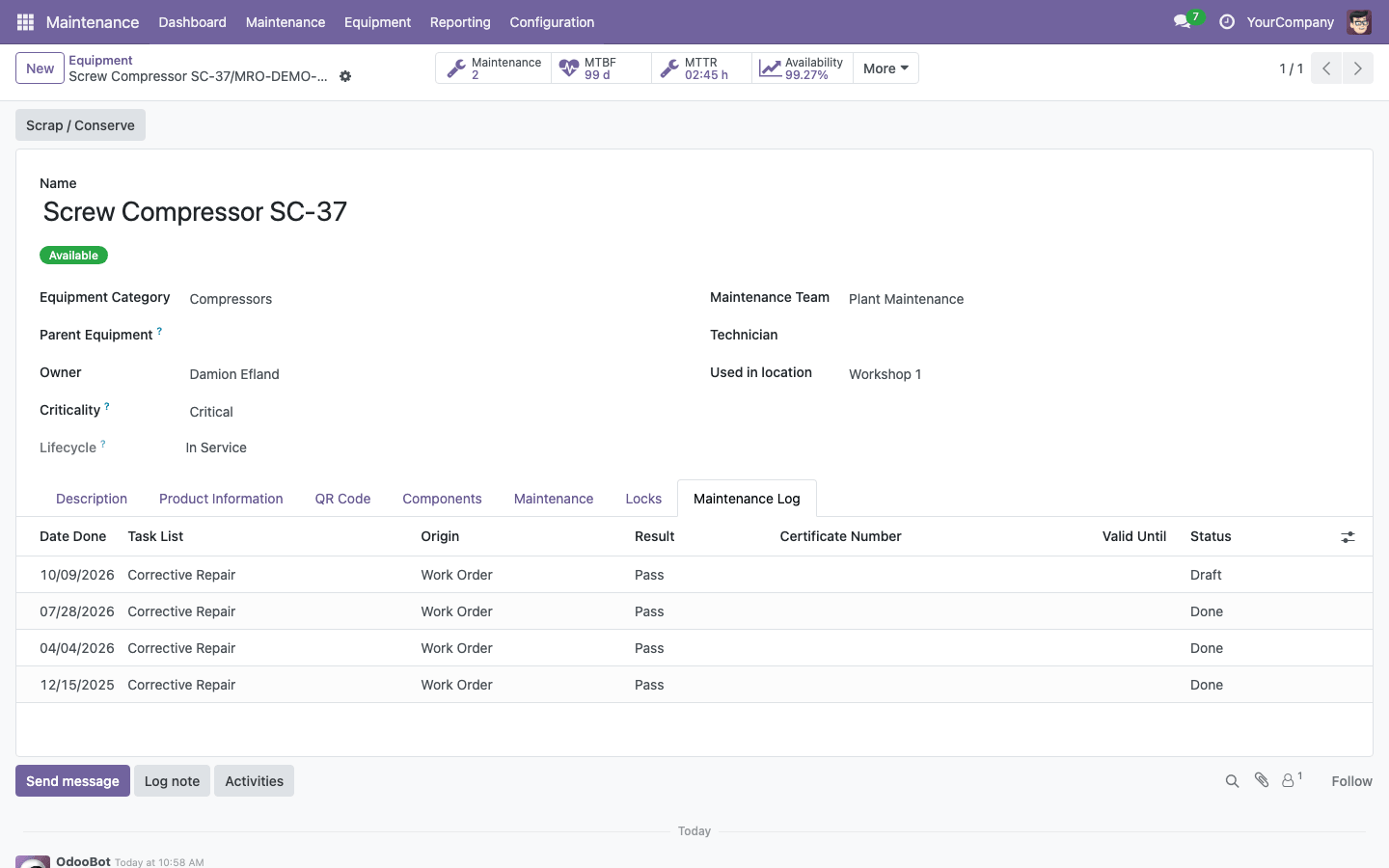
The equipment form shows the open requests, MTBF, MTTR, availability, cost and active locks. Over a year of breakdowns this compressor runs 99 days between failures (120 expected), is repaired in 2 h 45 min of net work (the wait for parts does not count) and was available 99.27% of the time. Hovering a button explains how its number is computed, so everyone reads the figures the same way.
Maintenance log of the equipment
Every finished job is one line: when, which task list, from which work order, with which result and certificate. Audits, certificates and the maintenance plans read the "last done" date from here instead of guessing it from closed requests.
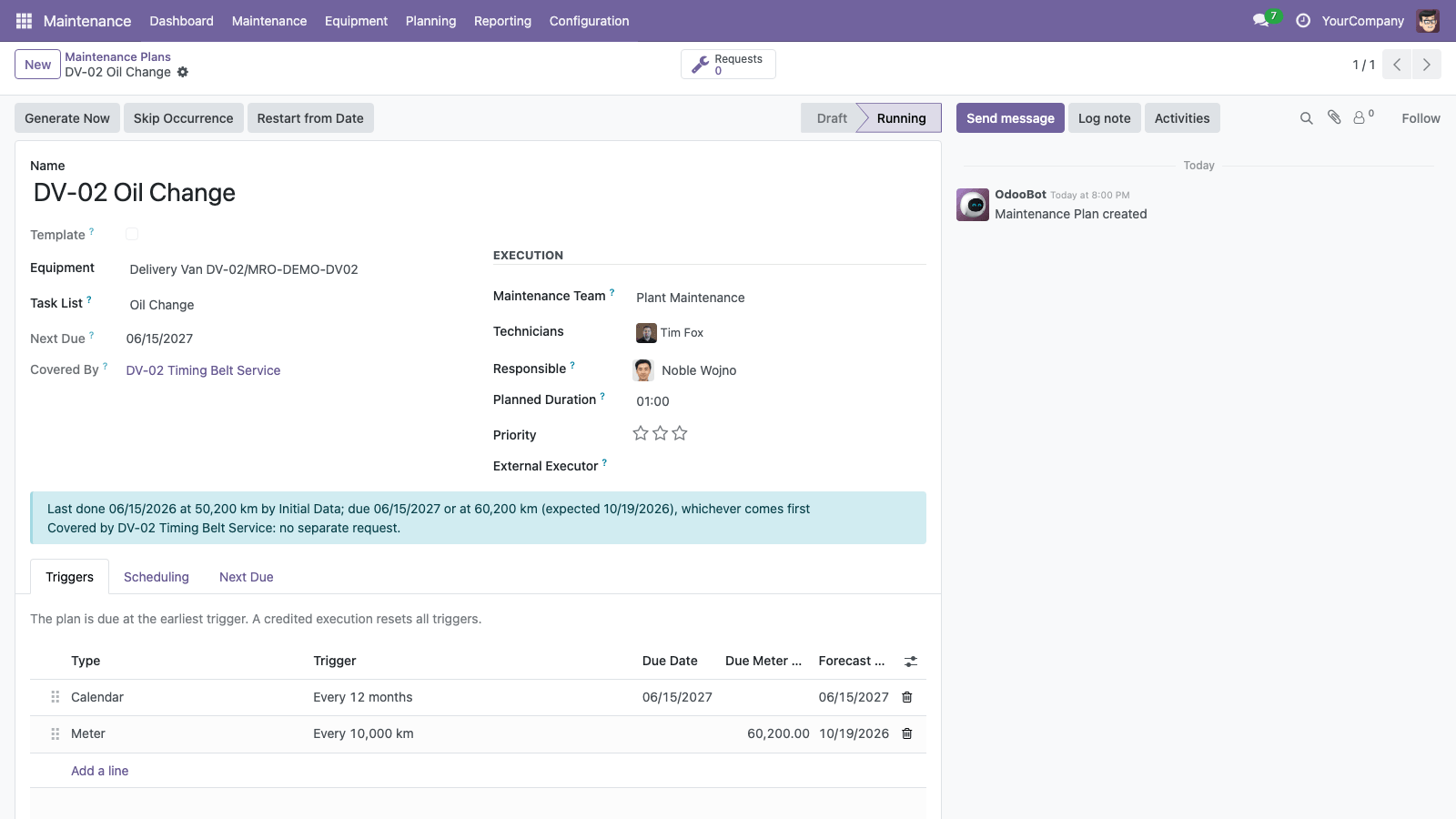
A maintenance plan by kilometres or months
The oil change of a delivery van is due every 10,000 km or 12 months, whichever comes first. The plan counts from the imported oil change at 50,200 km and explains its due date in one sentence. The timing belt service, which includes the oil change, is due at 60,000 km, so the oil change is covered by it and no separate request is created.
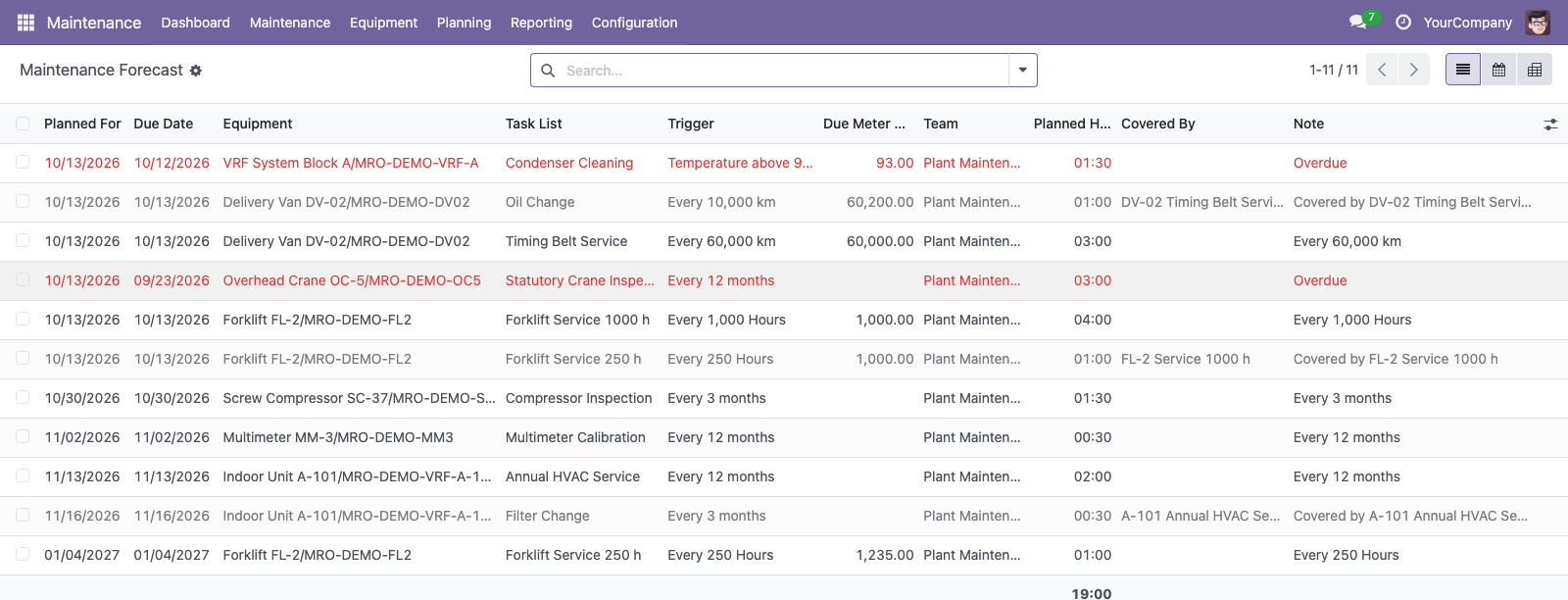
Maintenance forecast
The forecast lists every occurrence of the coming period by date, with its team, the planned hours, the overdue plans and the jobs covered by a bigger service; group it by team or month to see the workload. Draft plans of an import can be included, so the workload is known before the plans start. The forecast never creates requests.
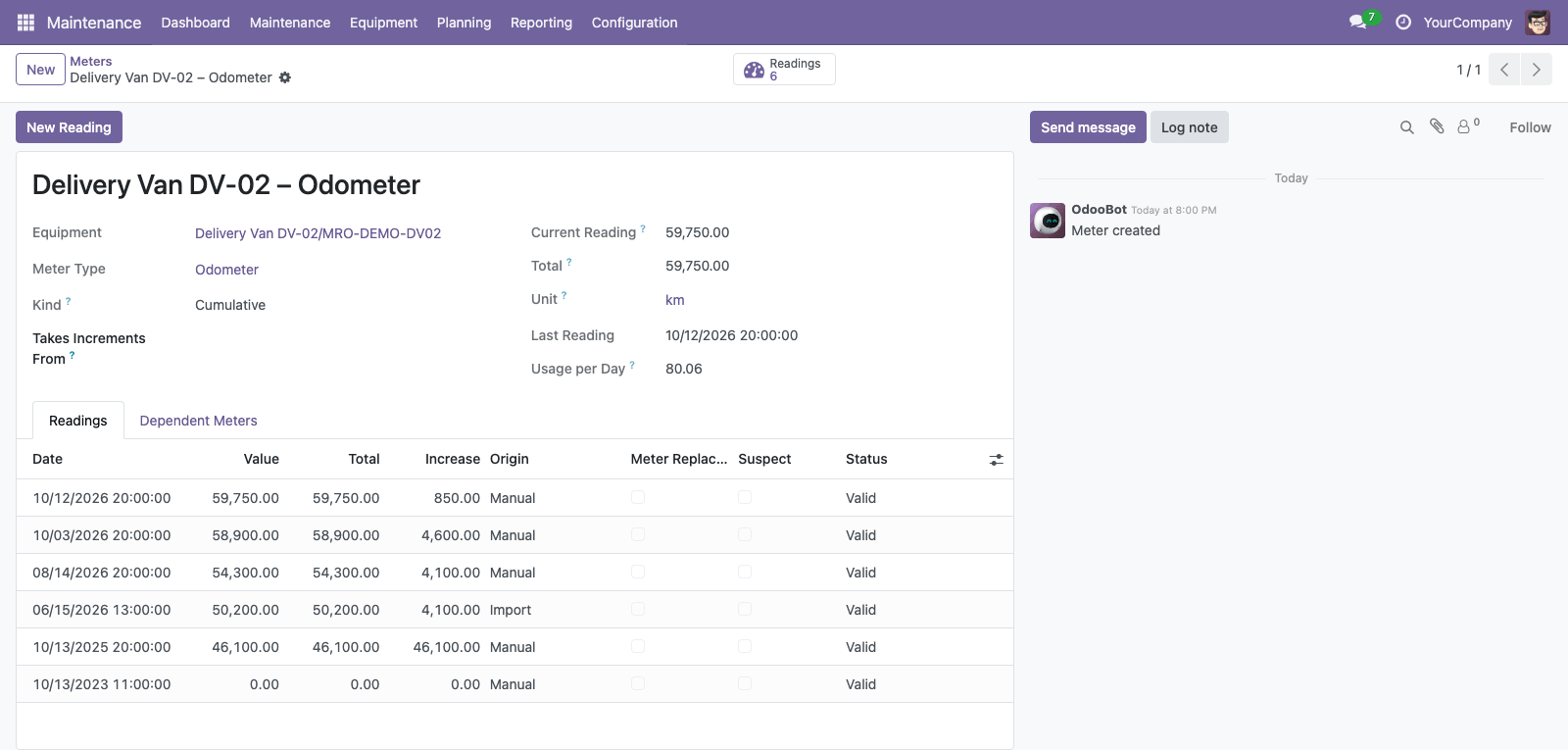
Meter readings
The odometer of the van with its readings: entered by hand, from work order steps or from imported history, with the running total and the average usage per day that forecasts the next due date. A wrong value is corrected with a reason; it is voided, never deleted.
Trend of a meter
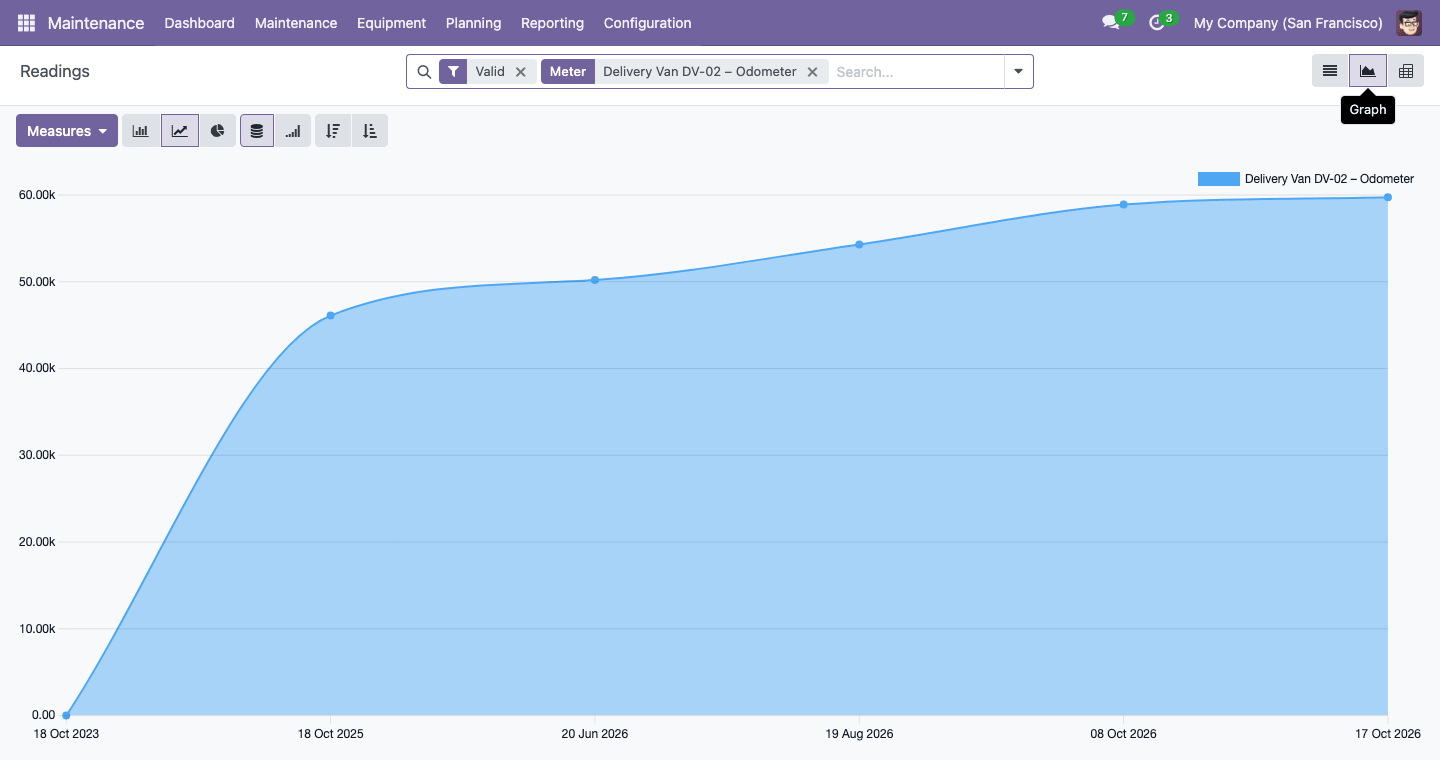
The readings of one meter as a chart: the odometer of the van over two years. Readings estimated rather than read on the device are marked "Estimated".
Work order analysis
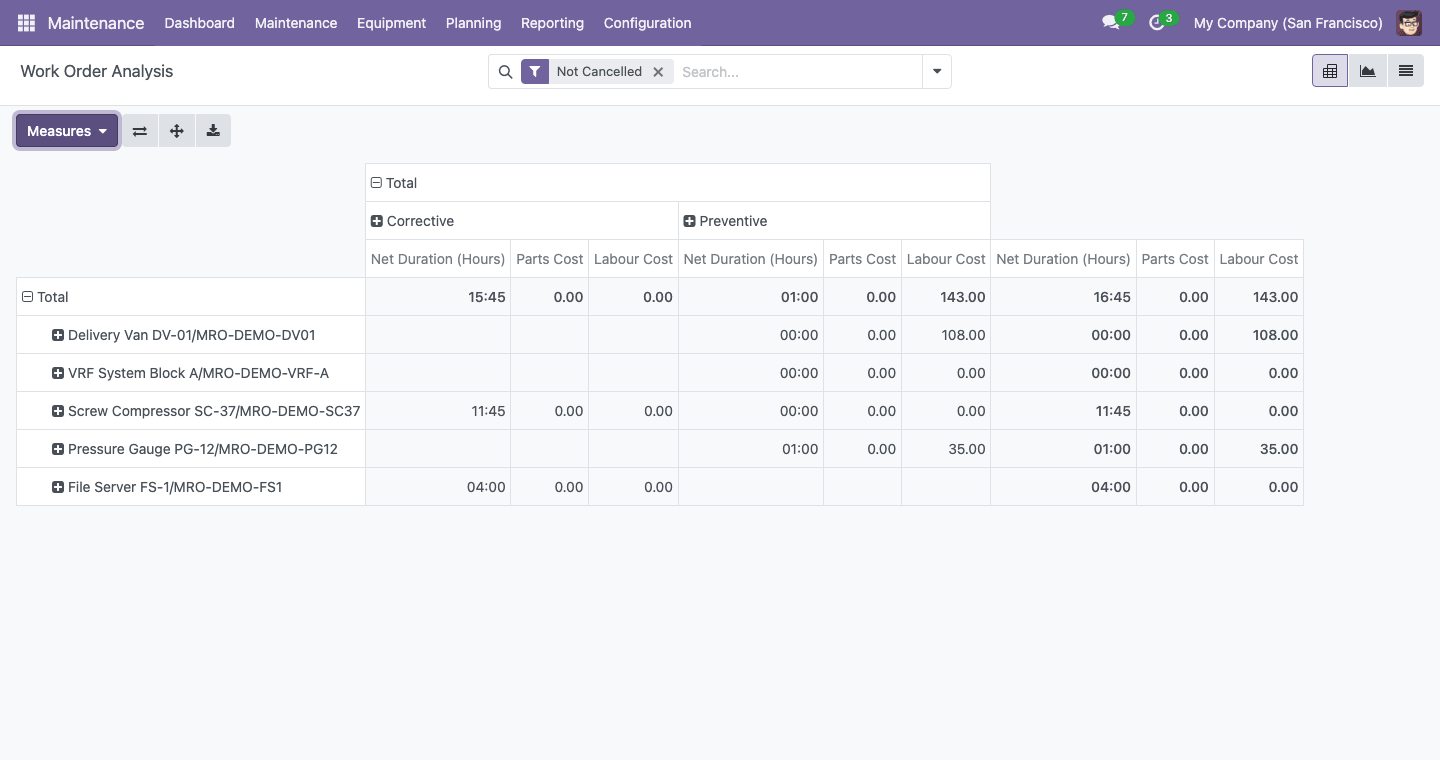
Net repair hours, costs and counts per equipment, maintenance type, team or technician, in pivot and graph views. Corrective work stands next to preventive work, so you see where the time goes; with the spare parts and timesheet modules, the parts and labour cost of each section are added.
Report a problem by QR code
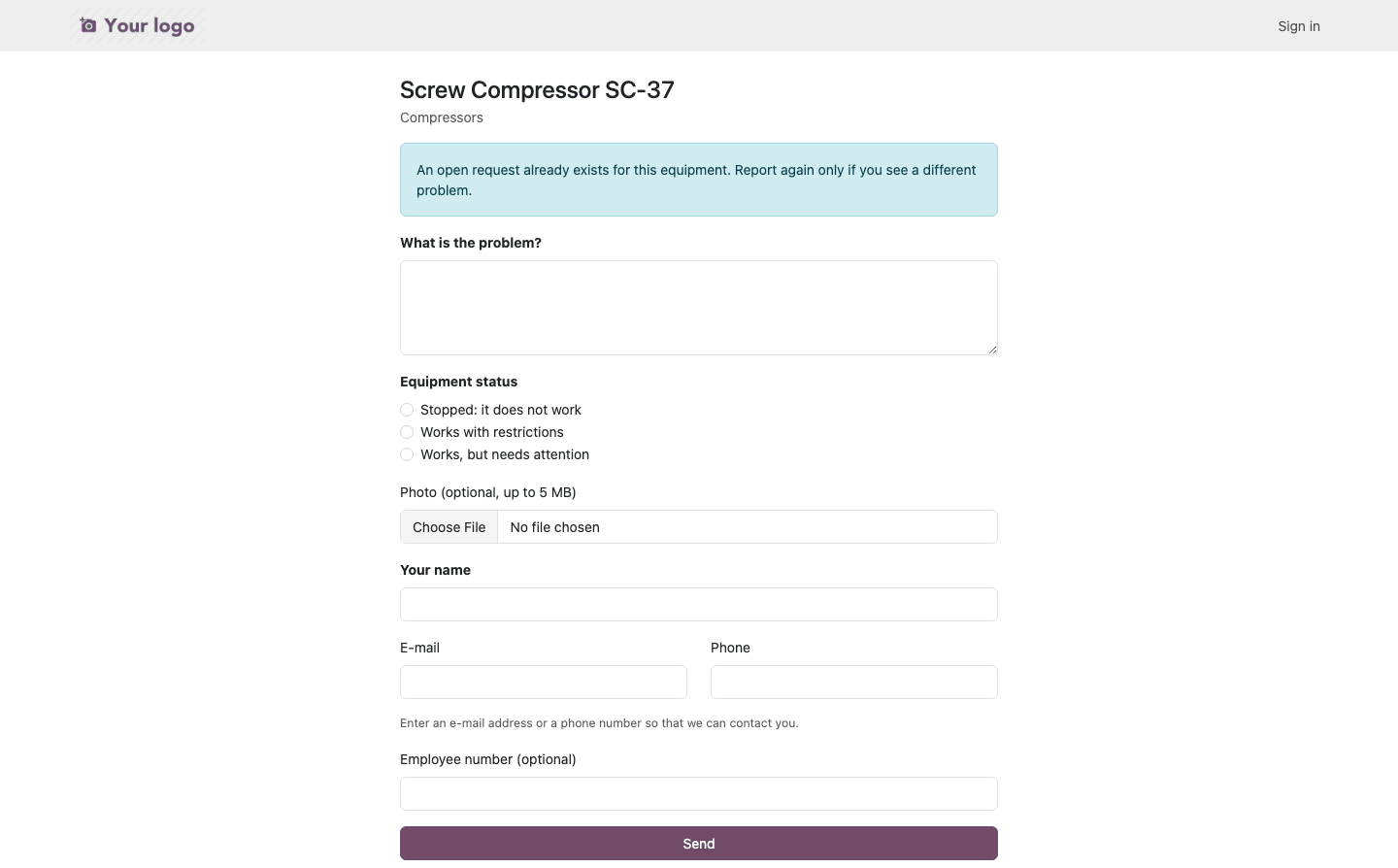
Anyone who scans the label on the equipment can report a problem without a user account: what is wrong, whether the machine still works, a photo and a way to call back. The form warns when the equipment is blocked and when a request is already open.
Link the reporter to a contact
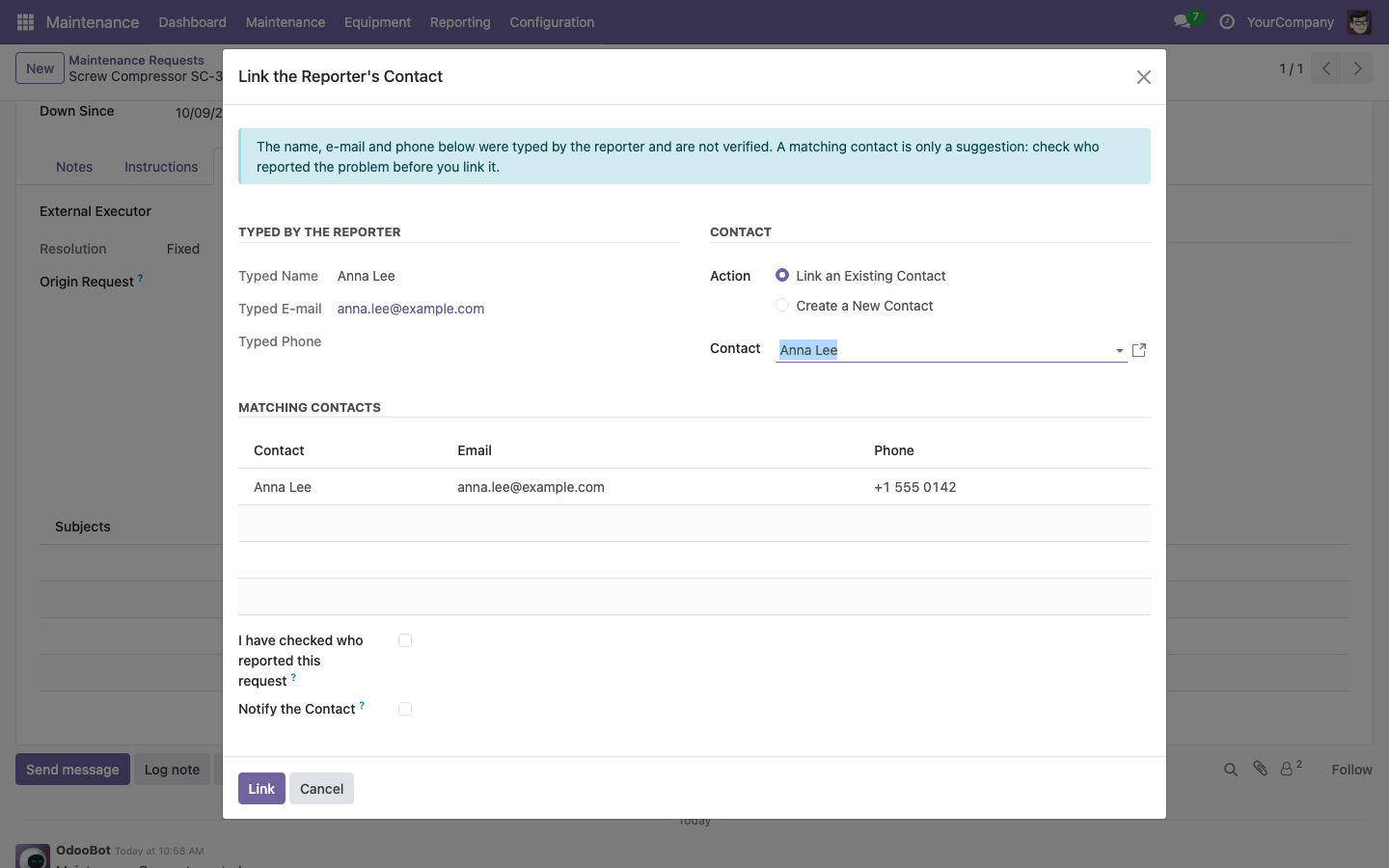
What a visitor typed in the QR form is kept as typed and never trusted on its own. The team responsible sees the contacts whose e-mail or phone match, checks who reported the problem and links the right contact or creates a new one; differing data are flagged and every link is written to the chatter.
How to Use
- Give users their maintenance roles in Settings > Users; an administrator reviews the MRO options in Maintenance > Configuration > Settings, including the Meters feature and the MRO start date.
- Set the acceptance mode and close confirmation of each maintenance team.
- Create task lists with steps, include the task lists that are always done together, and create the meter types you measure.
- Create maintenance plans with their triggers in Maintenance > Planning, or plan templates for whole equipment categories.
- After an import, check the forecast and use Start Plans; from then on the daily run creates the requests.
- Select requests and use "Create Work Order"; plan it, start it, fill the steps and finish it through the close wizard with the meter readings.
- Print QR labels from the equipment list and attach them to the equipment.
- Follow the forecast, the generation runs, PM compliance and the KPIs on the equipment form and in Reporting > Work Order Analysis.
Related Maintenance Modules
This module is the core of an MRO suite built on the standard Maintenance app. Add Spare Parts in Maintenance: Consumption, Replacement, Serial Numbers for spare parts lists, reservations, consumption from the warehouse or the technician's van, removed parts and the replacement of serial-numbered components on Inventory, and Maintenance Timesheets & Labor Cost for executors with or without a user, automatic timesheets and the labour cost of every work order on Timesheets. Parts and labour then appear on the same work order, its printed form, its total cost and its analytic accounts in Accounting. The maintenance requests stay standard, so the calendar, the Enterprise Gantt and worksheets keep working.
Email: sales@xfanis.dev
Telegram: https://t.me/xfanis
Want to know when this module gets a new version or fixes? Subscribe to updates (one email to sales@xfanis.dev, no spam).